Process the orders in seconds, using smarter filters
Find and group orders by product name, category, payment method, shipping details, and more — with up to 18 powerful filters added beside the default filters on your WooCommerce Orders page
| Order | Date | Status | Total |
|---|---|---|---|
| #110 Kowsar Hossain | Apr 15, 2025 | Processing | $98.00 |
| #88 Jon Doe | Nov 9, 2024 | On hold | $18.00 |
| #85 Kowsar Hossain | Sep 22, 2024 | Processing | $20.00 |
| #78 Kowsar Hossain | May 19, 2024 | Completed | $12.00 |
WooCommerce only filters orders by customer and date
That may be enough for a basic search, but not when you need to group orders using the details that matter to your workflow.
Stores lose 30–90 minutes per day manually trying to:
- ✕Find all orders containing a specific product or variation
- ✕Identify orders that include products from a certain category
- ✕Check which orders contain a particular SKU
- ✕Separate orders by payment method or order status
- ✕Find orders with particular billing or shipping details
Filter Orders by Product removes that manual work
It adds up to 18 powerful filters beside the default filters on your Orders page — filter by product, category, SKU, variation, payment method, billing and shipping details, and more.
Pick a filter, enter or select a value, and WooCommerce shows the matching orders together in one focused list.
Every filter your Orders page is missing
The Free version gives you 10 essential filters. Pro unlocks all 18 — including SKU, variation, stock status and the full set of shipping filters.
Product Filters
Order Filters
Billing Filters
Shipping Filters All Pro
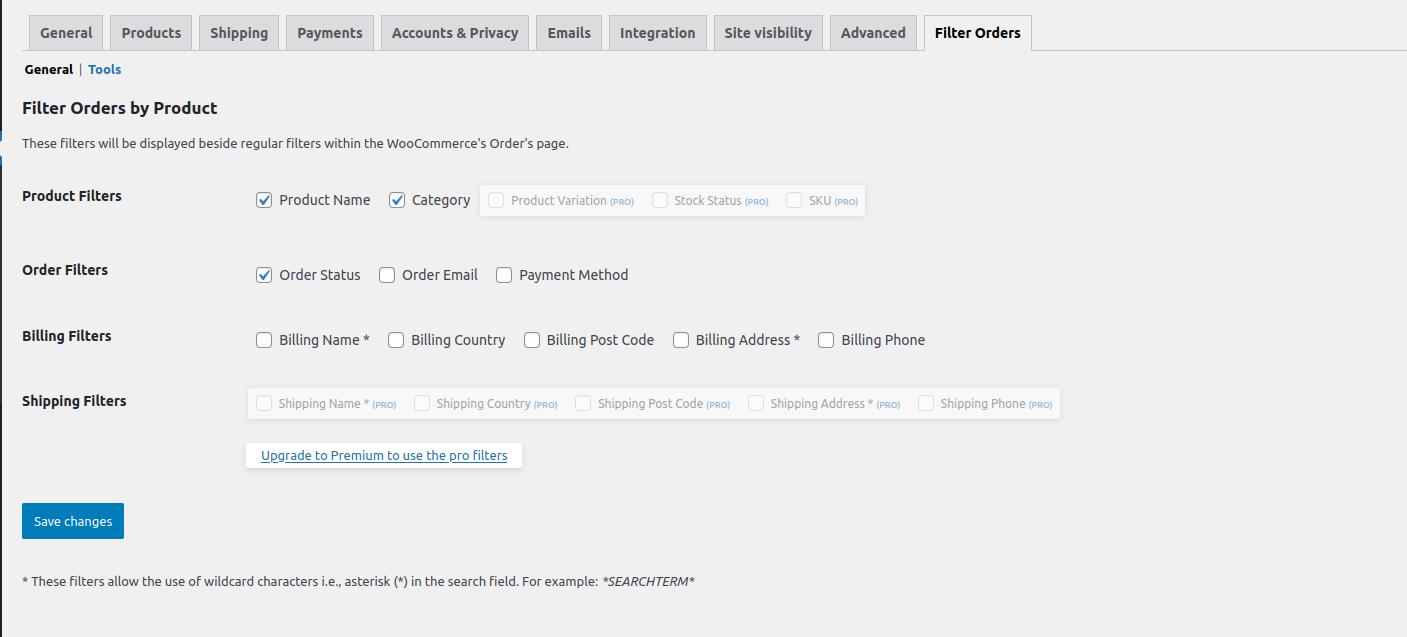
Choose which filters appear on the Orders page
Not every store needs every filter visible all the time. From the plugin settings page, you can decide which filters should be available on your WooCommerce Orders screen.
- ✓Enable or disable any of the 18 filters
- ✓Filters appear beside WooCommerce’s regular filters
- ✓Works with HPOS and the legacy database
Choose the license that fits your store.
14-day money-back guarantee · 1 year of updates & support
See exactly what’s included in Free vs Pro
| Filter group | Free | Pro |
|---|---|---|
| Product Filters Name, Category, Variation, Stock Status, SKU | 2 of 5 | All 5 |
| Order Filters Status, Email, Payment Method | All 3 | All 3 |
| Billing Filters Name, Country, Post Code, Address, Phone | All 5 | All 5 |
| Shipping Filters Name, Country, Post Code, Address, Phone | ✕ | All 5 |
| Choose which filters appear | ✓ | ✓ |
| HPOS & legacy database | ✓ | ✓ |
| Total filters | 10 | 18 |
Trusted by thousands of stores
Excellent plugin
“This plugin does exactly what it says, and good. Very handy and simply a must have. I have made my own (private) plugin depend on this one. Can’t live without it.”
Very nice plugin
“This plugin is super helpful. I wanted to add a link on a custom admin page to orders for a specific product, and I just had to copy the URL string and add it to a link. Many thanks to the author!”
Great and simple!
“Thank you very much, great and simple plugin!”
Good improvement
“Thanks for your plugin! I tried to integrate search by SKU for Woo, but then I found your plugin — it does the job perfectly.”
Handy — keeps getting better
“Add the ability to exclude a product or category and it gets a fifth star.” (Noted — more filter options are coming in future updates.)
$29/year — less than $2.50/month.
If the plugin saves even a few minutes of order searching each week, it can quickly justify its cost.
Your questions, answered
It adds extra filters beside the regular filters on your WooCommerce Orders page — so instead of only filtering by customer and date, you can filter by product, category, SKU, variation, stock status, order details, and billing and shipping fields.
The Free version includes 10 filters: Product Name, Category, Order Status, Order Email, Payment Method and all five Billing filters. Pro unlocks all 18 — adding Product Variation, Stock Status and SKU, plus every Shipping filter (Name, Country, Post Code, Address and Phone).
Yes. SKU filtering is one of the Pro filters, ideal for stores that manage products by SKU rather than name.
Yes. From the plugin’s Filter Orders settings tab you enable only the filters you want and disable the rest, keeping your Orders page clean.
Yes. Filter Orders by Product works with both WooCommerce High-Performance Order Storage (HPOS) and the legacy database, with no extra configuration.
Yes. The free version is on the WordPress.org plugin repository. You can upgrade to Pro anytime to unlock all 18 filters — your existing setup carries over.
Take control of your WooCommerce orders
Start with the free 10 filters, then upgrade to Pro for all 18 whenever you’re ready.